


The Interior Design Client Process Kit
The Interior Design Client Process Kit

"Not everyone can read floor plans, and these templates bridge that gap by offering a clear, comprehensive guide. They fully support my communication with clients, making the entire process much easier. "
Your client skips straight to the total and starts negotiating, it means your proposal lose the job before the client reads the fee.
This one builds the case first, so by the time the investment appears, it feels grounded and the project begins from a position of mutual clarity.
 Prewritten scope conditions that protect you from unpaid extra work.
90% reported close rate from designers using structured proposals.
CHOOSE YOUR PRACTICE SIZE
Already own one of our templates? We'll credit 100% of your previous template purchase toward the Client Process Kit. Chat with us →
You won't pay twice for what you already have.
Couldn't load pickup availability
Split your purchase into 3 interest-free payments with Klarna — no extra fees at checkout.
Instant Access
One-time Payment
Lifetime Use
What's the fastest way to get this sent tonight?
What's the fastest way to get this sent tonight?
Upon purchase, you’ll receive immediate access via PDF, linking you to your templates.
- Edit your project details in your preferred software, Adobe InDesign, PowerPoint or Canva.
- Send it . Once you've finished your design, download it and share it digitally, or printed.
A pre-built scope of services and fee grid means you're not rewriting from scratch or missing anything, just fill in the numbers and you're done.
What's Inside?
What's Inside?
FEE PROPOSAL workflow & sections:
- Our Brief
- What’s important to you?
- Project Inspiration
- Your Project Roadmap
- Our Fee and Payment Schedule
- Terms and Conditions
- Next Steps
- Our Studio
- The Design Team
- How We Communicate
- Sustainability
- Project Profiles
- Frequently Asked Questions
- Schedule of Services
- Contact
- And More...
27 pages. Fully editable.
Software: Canva, Adobe InDesign, PowerPoint
Formats: A3 sizes: 16:9 ratio, 4:3 ratio, A3, A4 & US Letter
Includes: Help guide, 100+ premium fonts & 100+ placeholder images.
Want a better deal?
Want a better deal?
Individual templates solve individual problems.
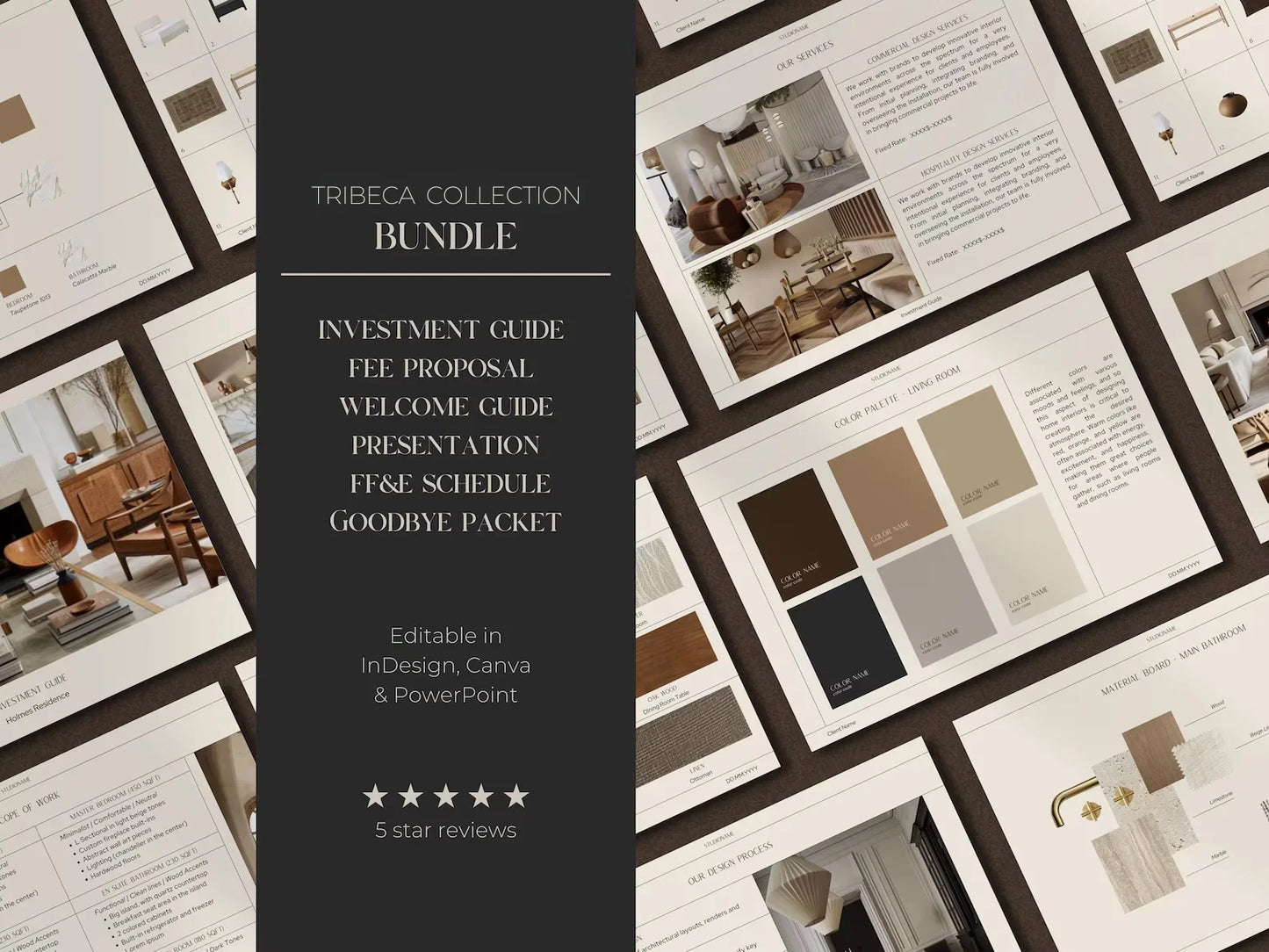
The Client Process Kit gives you the communication backbone your studio needs, without rewriting from scratch or missing details.
- Investment & Services Guide (28 pages)
- Fee Proposal (27 pages)
- Design Presentation (35 pages)
- Welcome Guide (19 pages)
- FF&E Schedule (27 pages)
- Goodbye Packet (15 pages)
Bonus :
- Client Questionnaire template ( 5 pages) Google Forms templates
- Feedback / Testimonial Form template ( 5 pages) Google Forms templates
- Invoice & Receipt templates
- Step-by-step guide to help you edit the templates in Canva
- 100+ Premium Fonts used in the templates.
100+ Premium Placeholder Images - Formats: 3 sizes: 16:9 ratio, 4:3 ratio, A3, A4 & US Letter
- Software: Canva, Adobe InDesign, PowerPoint, Google Sheets.
One purchase. Lifetime access.
Create a consistent, professional system where every document your client receives looks and feels like it came from the same exceptional studio.
Tax-deductible business expense
Tax-deductible business expense
Business Expense
This investment is a tax-deductible business expense,
Check with your accountant if you're not sure, most designers are pleasantly surprised.
↓ Keep scrolling to see a breakdown of each of the sections ↓


49,000+ Templates Downloaded. One System, Every Client Touchpoint Covered.
Real studios. Real projects. Every phase told by the same professional voice.
One License Isn't Enough? Bring Your Whole Team.
The Complete Client Experience covers one designer. The Studio License extends the exact same system to your entire team, every document, every phase, one shared brand across every project.
We're a five person studio and client experience used to vary depending on who was running the project. The studio license means every designer works from the same branded system now.
Marcus Chen, Studio PrincipalDid the math and licensing for our three designers individually would have cost considerably more than the studio license. Upgraded within a week of buying the single kit once I saw the numbers.
Adaeze Fombe, Studio OwnerEvery new designer we bring on gets access to the same licensed system immediately. No ramp up time figuring out our documentation, they're sending professional, on-brand documents from their first week.
Torsten Achebe, Managing Director
Value Before Pricing
Why Most proposals lose the job before the client reads the fee.
You lose projects because you send a simple estimate that looks like an invoice. When clients see a high number with zero context, their only option is to negotiate.
This template changes that dynamic. It walks the client through the value of your work (the phases, the deliverables, the logistics) before they see the cost.
It shifts the conversation from"Why is this so expensive?"
to "I see how much work is involved."

The Client Experience
What this does for your studio?
A proposal isn't just a price tag; it sets the tone for the entire project.
If your proposal is messy or vague, the client assumes your project management will be too.
By presenting a structured, professional document, you signal that you are an organised studio capable of managing their investment.
It builds the trust required to get a "Yes" on high-value fees.
What if your proposal could speak for itself.


This fee proposal template
Does the selling for you
Project Overview
Start by restating the brief to confirm you understand their goals, priorities,
and constraints.
This grounds the proposal in their specific project rather than presenting a generic offer.
Scope of Work & Deliverables
A clear breakdown of your design process and exactly what the client receives at
each stage. This makes your intangible service feel tangible and helps clients understand the full extent of the work involved.
Communication & Timeline
Manage expectations with a Project Timeline visualisation and a Communication page that defines how you will work together throughout the project.
Scope Conditions & Exclusions
Define exactly what is and is not included. This protects your margins and prevents
scope creep by documenting boundaries before workbegins.
Fee Summary & Payment Schedule
Present your fees clearly alongside a phased Payment Schedule, ensuring cash
flow aligns with work progress.
Related Projects
Showcase previous work that aligns with the scope or style of the project you
are proposing for.
This reinforces your relevant experience and helps the client visualise what you can deliver for them.
Made for winning clients
Workflow & Sections are designed to be fully customisable. You can use the full structure for large renovations or delete sections for smaller design projects.
90%
Designers who've switched to this report a close rate around 90%." Proven high converting structure.*
83%
Reduction in client revision requests reported after sending a professional onboarding document from day one.*
95%
Designers using structured proposal reports save an average of 7hours from open to client-ready proposal.*
*Based on 48,836+ designers using this structure on real client projects.

Three Versions
Available in InDesign, Canva, and PowerPoint
All three versions included when you buy.
Open in what you already use.

Nine files
Each version comes in A4, 16:9, and US Letter,
Three formats across three software versions,
Nine files in total. Print it or send it digitally.
One purchase covers every format your studio or client might need.

Fonts & Placeholders
Ready to brand from day one:
100+ premium fonts and 100+ placeholder images included. Use your own or keep ours, either way, you're not starting from a blank canvas.
IN THEIR WORDS
What changes when communication is clear.
-

"We have been using the templates for a little while now and we're genuinely thrilled with the results. Before our systems didn't really flow, everything was done in different formats, which slowed us down and sometimes made things look inconsistent. Now, with your templates our process is seamless."
-

"As an architect, it's easy to get lost in presentation, wanting control over every detail, spending hours tweaking but using a well-designed, beautiful template has freed up my headspace to focus on the work itself. With just a few tweaks, I now have a go-to branded template I can reuse across projects."
-

"They fully support my communication with clients, making the entire process much easier. Not everyone can read floor plans, and these templates bridge that gap by offering a clear, comprehensive guide."


What if your entire client process was already built.
How many late nights have you spent formatting, rewriting the same sections, or starting from scratch under deadline pressure?
→ This client process kit covers every document your client receives across the entire project journey, without rewriting from scratch or missing details.
Beyond consistency, one purchase saves you over $200 compared to buying each template separately.

The CLIENT PROCESS KIT
280+ prewritten sections
Fully customisable
One-time purchase
Ready to use.
*This Offer Ends on -
Instant access
 14 Day Money-Back
| CLIENT PROCESS KIT | Individual Templates | |
|---|---|---|
| Consistent client experience | ||
| Tax-Deductible Business Expense | ||
| Save 10+ Hours | ||
| Cohesive Studio Branding | ||
| $250 Included Bonuses | ||
| 14-Day Money Back |
INVESTEMENT GUIDE
•
WELCOME GUIDE
•
FEE PROPOSAL
•
DESIGN PRESENTATION
•
FF&E Specification Template
•
HANDOVER & CARE GUIDE
•
GOODBYE PACKET
•
CLIENT QUESTIONNAIRE
•
TESTIMONIALS FORM
•
INVOICE & RECEIPT Templates
•
INVESTEMENT GUIDE
•
WELCOME GUIDE
•
FEE PROPOSAL
•
DESIGN PRESENTATION
•
FF&E Specification Template
•
HANDOVER & CARE GUIDE
•
GOODBYE PACKET
•
CLIENT QUESTIONNAIRE
•
TESTIMONIALS FORM
•
INVOICE & RECEIPT Templates
•
a tax-deductible business expense
Why should I invest in this?
A legitimate business expense
A legitimate business expense
Professional tools that support your studio's revenue typically qualify as tax-deductible business expense. This investment falls under that category.
Check with your accountant if you're not sure, most designers are pleasantly surprised.
Pay in three, Interest-free
Pay in three, Interest-free
with Klarna Split your purchase into three payments, no interest, no fees. Get the template today and pay as your next project closes.
14 day money-back guarantee
14 day money-back guarantee
Most studio stores don't offer refunds. We do.
14 days, full refund.
We're confident enough in this template that taking on that risk is easy.
It pays for itself on the first project
It pays for itself on the first project
One closed project at your rate covers this many times over. The template pays for itself before the invoice goes out.
Under 30 minutes from open to send
Under 30 minutes from open to send
The structure is built. The language is written. Add your project details and you're done.
Most designers who switch stop thinking of this as an admin task entirely.
49,000+ templates sold to designers around the world
Excellent 4.7 / 5
Based on 48,836 Fellow Designers
-
Fantastic!
Although I am pretty savvy with making templates I just don’t have the time to invest in making one.
I looked all over to find a template that wasn’t not on canva and I would feel comfortable using with my own content and this exceeded my expectations. This literally does it all and more. It’s a fantastic template for professionals and I especially love the minimalist look of it. incredibly polished.

-
Highly recommend, great value!!
Super easy to adjust to fit your needs and looks so professional!
Already received compliments from a client and plan to purchase more templates for consistency within our studio. If you're reading this review, do yourself a favor and hit purchase!
-
The template is amazing!
I appreciate the pre-written content and found the document easy to edit
The template is amazing! This is an excellent value for the price paid. I have already sent it to three clients, and their responses were positive, and they were impressed with the overall delivery of information.
-
Game Changer!
Hi there,
I absolutely love this template, it's a complete game changer!
Not only did this save me so much time, but it also provided endless inspiration when I was putting together my very own portfolio.
It's beautifully laid out, easy to edit, and the client process kit have quickly become my go-to resource for all my projects.
Thank you!
-
Helpful & professional looking
I used the Fee Proposal template so far and thought it was really helpful. It helped me structure the document and the graphics made it look neat and professional. I also like the access to the image library.
-
Great structure, Great delivery
The template was great to give me structure for a quick turnover Discovery call that I could make mine.
Definitely professional value driven text is a goldmine to give direction of not starting from scratch.
Super-organised folders. Very impressed by the delivery.
-
Love the template
Love the template, so elegant. I found it was a fantastic starting point and so easy to edit and make it work with my style and workflow. I had a query in advance of purchasing and Nathan got back to me so promptly. I will definitely explore using more templates from the client process kit. For reference I use Canva Free.
-
So far it looks good.
I'm just getting started in modifying and customizing the templates to my image. I've gone through the Step-by-step guide explaining how to use/modify it and it's pretty well done.
So far it looks good. I'm looking forward to the first feedback from clients. Their opinion is more valuable than mine, at least in this case. ;)
-
Best templates for Interior Designers
The client process kit is so easy to use and make my documents look much more professional. The hardest part is deciding which template style to buy because I love them all!
-
Stunning and so easy to use
We'd been looking for a beautiful, easy-to-customise template for a while. As we already have quite a lot of design process established, it was important to be able to customise to fit in our branding. This did a great job.
-
Amazing! Thank you so much.
Absolutely love the template I purchased, So easy to use and so chic! It really upped my firms game and everyone is so impressed. thank you so much.
-
Absolutely Amazing!
Beautiful template, it’s going to help us strengthen our studio’s visual language and streamline our work. I’m so thrilled ! Excellent communication and customer service as well. highly recommend.
-
Fantastic!
I am so glad I purchased these templates! It really has made the process to creating visuals and presentations for my clients so much easier! There’s so much information and it is like a fill in the box so it makes work so much quicker instead of guessing what I should include. Thank you! I highly recommend !
-
Amazing!
Amazing! I have purchased some templates and they have been so useful in providing a new facelift to my business. Very professional and visually appealing. very happy!
-
Your client onboarding / Welcome pack
Your client on-boarding / Welcome pack template was just what I needed to give me the kickstart to do this. It had been on my to do list for way too long. Having a beautiful visual templates to work with and a good content was inevitable .
Without it I would have put it off for even longer. Totally worth the payment.
-
Expert level authenticity
I can feel the authenticity and level of detail + energy that goes into this client process kit. I just read one of your emails in my inbox and it's well laid out and genuine content that is true to real-life situations for people in our trade.
Thank you for putting in the dedication to support our trade.
-
Great content!
Being a business owner means juggling countless roles and
constantly adapting in a fast-evolving industry.This client process kit makes
it easier with practical, customisable templates that actually work.
-
Supporting
I'm genuinely grateful for the clarity and support I found here. Knowing that others face the same challenges made me feel less alone, and what really stood out was seeing actual solutions being offered. It's reassuring to have my concerns validated and to know there's a path forward.
Thank you for creating such a helpful and understanding community.
-
The best investment I've made in my business
I was nervous about buying this template, thinking there'd be no way it would be as easy to use and as well laid out as described. I've been burned on templates in the past. Now my only regret is that I didn't buy the whole bundle straight out of the gate. The downloadable files were very well organized, easy to import, and I was up and running in under three minutes. I knocked the socks off my client and secured a HUGE project by page 2 - I'm not kidding. The client told me that if my presentation was this well prepared, they'd trust everything else would follow suit - so a HUGE thank you to the team/designer who built this. You put food on my table for the next year, seriously
-
Just incredible!
Just incredible!
As an interior designer just starting out these templates are invaluable additions to achieve a clean, luxury desired communication experience with the client. I just love it

Frequently asked questions
Questions & Answers
How long will it take me to set up?
How long will it take me to set up?
If your content is ready, you can drop in your images, text, and project details in under an hour. The framework is already in place, so you're not starting from zero.
Does this include pre-written text?
Does this include pre-written text?
Yes.
Unlike templates that rely on standard placeholder text (Lorem Ipsum),
this document includes professional industry language throughout.
You can use the existing copy as a foundation and simply edit the details to align with your studio's processes.
Is it fully customisable?
Is it fully customisable?
Yes.
Drag and drop your project details easily, edit every detail to match your studio's branding, or keep the design as is.
Can I use this for different project types?
Can I use this for different project types?
Yes.
the template is flexible enough for residential or commercial projects. Adjust the scope and deliverables sections to match what you're offering.
Is technical support available?
Is technical support available?
Yes.
We include a comprehensive help guide with your download. If you encounter any technical issues with the files, please reach out to our support team.
Contact : friends@slfmade.co
Why is this important?
Why is this important?
Consistency builds trust and shows clients that you’re reliable, professional, and detail oriented.
A cohesive look and feel reflect your commitment to excellence, which clients subconsciously associate with the quality of your work.
How do they help with converting clients?
How do they help with converting clients?
These templates follow a high-converting framework designed to guide clients through the decision-making process.
They combine clear structure, persuasive content, and social proof to remove friction and help clients confidently choose you.
Are these templates for Architects & Interior Designers?
Are these templates for Architects & Interior Designers?
Yes,
Every piece of content and framework you'll find here has been developed and rigorously tested by our collective of working Architects & Interior designers.
We don't theorize, our methods are proven in real studios, on real projects, by the professionals who stand behind them.
Is the client process kit worth it if I only need one template right now?
Is the client process kit worth it if I only need one template right now?
It depends on how long "right now" lasts. Most designers return for a second template.
That's why we created the client process kit, to save you time and over $200 in a single investment.
Buying templates separately creates gaps in your workflow. By then, you've spent more than the complete system costs.
The Client Process Kit pays for itself faster.
Everything is designed to work as one.
I bought an individual template. Can I upgrade to the full client process kit?
I bought an individual template. Can I upgrade to the full client process kit?
Yes.
If you've already purchased an individual template and want to upgrade to the client process kit, email us with your order confirmation and we'll apply what you've already paid as a credit toward the full kit.
You won't pay twice for what you already have.
